Quick answer: Handle a Business Profile suspension by checking the profile against Google’s guidelines, preparing documents whose business name and address match the listing, and filing one appeal in Google’s appeals tool. Google says appeals can only be submitted once, so a white label SEO partner should prepare the case before you submit it.
Key takeaways
- A Business Profile suspension is Google’s action against a profile that does not follow its guidelines, and the profile cannot be reached by the public while it lasts.
- Google’s help pages name guideline violations as the reason for suspensions, and the guidelines page lists specific rules on names, addresses, categories and service areas.
- The appeals tool takes 6 steps, and Google says appeals can only be submitted once, so evidence must be ready before you start.
- Google says appeals and decisions can take up to 5 business days, and it advises you not to create a new profile for the same business.
- Clients with 10 or more suspended locations use a bulk reinstatement option that needs a spreadsheet of Business Profile IDs.
- Your agency owns client documents and communication, and your white label SEO partner owns the audit, the evidence pack and the appeal tracking.
What is a Google Business Profile suspension?
A Google Business Profile suspension is an action Google takes against a business listing that does not follow its guidelines. Google’s help page “Fix suspended or disabled profiles” says Google may suspend or disable Business Profiles that don’t follow its guidelines, and that you can appeal if you believe the profile should be reinstated.
While a profile is removed, the public can’t access it, and owners and managers can’t act on it. The help page does not explain how a suspended profile differs from a disabled one, so this post uses “Business Profile suspension” for both and follows the page’s wording on each point.
For an agency that resells local SEO, a suspension is a service event: the client sees a missing listing and asks you what happened. Our white label local SEO work treats the profile as an asset to protect, and the rest of this post covers how a partner supports that.
Why does a Business Profile suspension happen?
Google suspends a Business Profile when it does not follow the Business Profile guidelines. The help page names guideline violations as the stated reason, and the guidelines page adds that including unnecessary information in a business name could result in the suspension of your Business Profile.
The guidelines page also says Google reserves the right to suspend access to Business Profiles for guideline violations. Neither help page lists every possible trigger or says how often each one leads to a suspension, so do not tell a client that a single edit caused it unless the appeals tool shows the reason. The tool shows the decision date, the reason, a link to the violated policy and whether the decision can be appealed.
Read that reason before you do anything else. It decides which evidence you gather and which part of the profile you correct first.
Which guidelines should an agency check before a Business Profile suspension appeal?
An agency should check the rules on business name, address, categories and service area first, because Google’s guidelines page sets specific limits on each. The table below lists 6 rules from that page that you can compare against a client’s profile before you appeal.
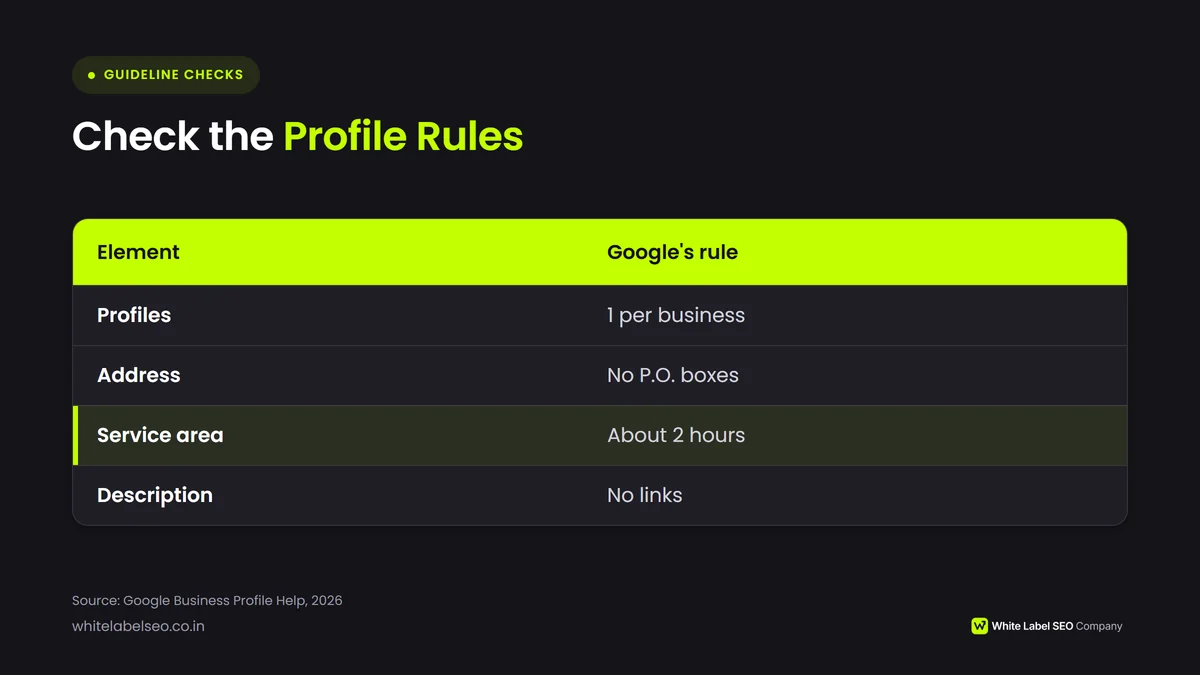
| Profile element | What Google’s guidelines say | What to check on the client profile |
|---|---|---|
| Profiles per business | Only 1 profile per business | No duplicate profile for the same business |
| Business name | Matches the real-world name; no taglines, store codes, hours, phone numbers or URLs | Name equals the storefront and website name |
| Address | Precise, real-world address; P.O. boxes and remote mailboxes are not acceptable; 1 page per location | Address is a real location the business uses |
| Service area | Should not extend farther than about 2 hours of driving time from the business | Service area fits the 2-hour limit |
| Categories | The fewest categories that describe the core business, as specific as possible | No extra or nearby-business categories |
| Business description | No promotions, prices or links | Description has none of the three |
The table shows that most checks are about matching the profile to the real business, which is the same idea the appeal evidence rests on. Source: Google Business Profile Help, guidelines page, accessed November 28, 2026. The page also covers virtual offices, co-working spaces and regulated products, so read it in full for a client in those situations.
How do you appeal a Business Profile suspension?
You appeal a Business Profile suspension in the appeals tool in 6 steps, and Google says appeals can only be submitted once. Prepare the profile and the evidence first, then submit, so that the single appeal carries everything Google can use to reinstate the profile.
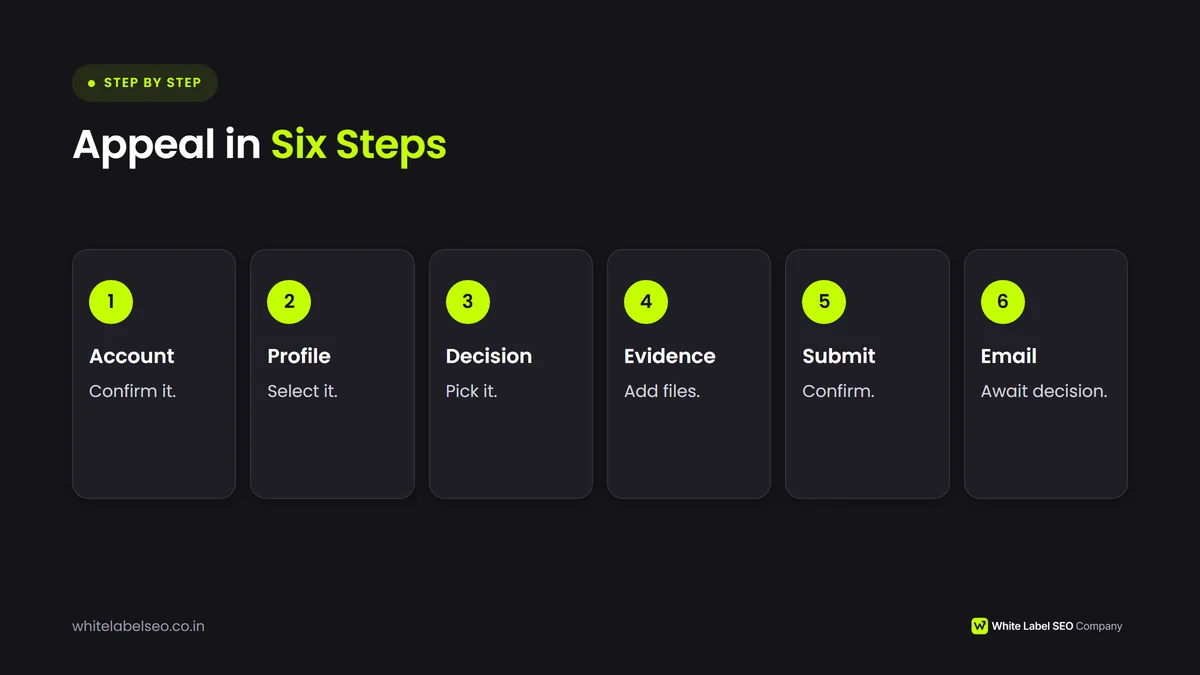
The 6 steps of a Business Profile suspension appeal are listed below, as Google’s help pages describe them.
- Confirm the Google Account. Open the appeals tool and confirm that the account linked to the profile is the one you are using, or switch accounts.
- Select the Business Profile. Pick the suspended profile and continue.
- Select the decision to appeal. The tool shows the decision date, the reason, a link to the violated policy and whether the decision can be appealed.
- Add evidence and an explanation. Optionally upload files and explain in the text box why the profile should be reinstated.
- Confirm and submit. Check the box that says you are ready and that all evidence is attached, then select Submit appeal.
- Wait for the email. Google emails you the appeal decision.
Before step 1, make sure the profile follows all of Google’s guidelines, as the help page advises. Do not submit more than one appeal for the same issue before you receive a decision, and do not create a new profile for the same business. Our guide to local SEO tasks to white label shows where profile work fits next to citations, reviews and location pages.
What evidence should you prepare for a Business Profile suspension appeal?
Prepare supporting documents that show a business name and address matching the profile. Google’s help pages list official business registration, a business license, tax certificates and utility bills, such as electricity, phone, water or internet, as examples of evidence that can strengthen an appeal.
The key rule is the match. The business name and address on each document should match the Business Profile, and for bulk requests Google says they must exactly match your registration. Check every document against the profile before you upload it, and correct the profile first if a detail is wrong.
Evidence is optional in the tool, but with only one appeal allowed, you should treat it as required. Collect the documents from your client through your normal onboarding channel, and give your partner a copy so it can check each name and address against the profile.
How long does a Business Profile suspension appeal take?
Google’s help page says appeals and decisions can take up to 5 business days. The appeals tool then shows one of 5 statuses: Submitted, Approved, Not Approved, Can’t be appealed or Eligible for appeal. Google emails you the decision.
The help pages give no other timeline, and they do not promise reinstatement, so give your client the 5-business-day figure as the most Google states and avoid promising an outcome. If the request is denied, Google says it might do an additional review. You can submit evidence that was not in the original appeal through the local appeals contact form. Users in the European Economic Area may have additional redress options.
Tell the client what each status means in your own words and set a date to check the tool. That keeps the conversation factual while you wait.
What changes with 10 or more Business Profile suspensions?
Clients with 10 or more suspended locations can request bulk reinstatement in the appeals tool. The tool asks whether you are requesting bulk reinstatement for 10 or more suspended locations, and if you answer Yes, you attach a spreadsheet listing the Business Profile ID of each suspended location, plus supporting documents.
Google emails one decision, and only for the profile you selected in the tool. The statuses of the other profiles in the request are not updated in the tool. Plan for that in your reporting: keep your own tracking sheet with each Business Profile ID, the date of the request and the outcome you observe on each listing.
Multi-location clients make this a portfolio job. Our post on white label local SEO for agencies managing multi-location clients covers how to organize profile work across locations.
What should your agency own and what should a white label SEO partner handle in a Business Profile suspension?
Your agency should own the client relationship, the documents and the Google Account access, and your white label SEO partner should own the profile audit, the evidence pack and the appeal tracking. The split keeps client contact with you and the repeatable checking with your partner.
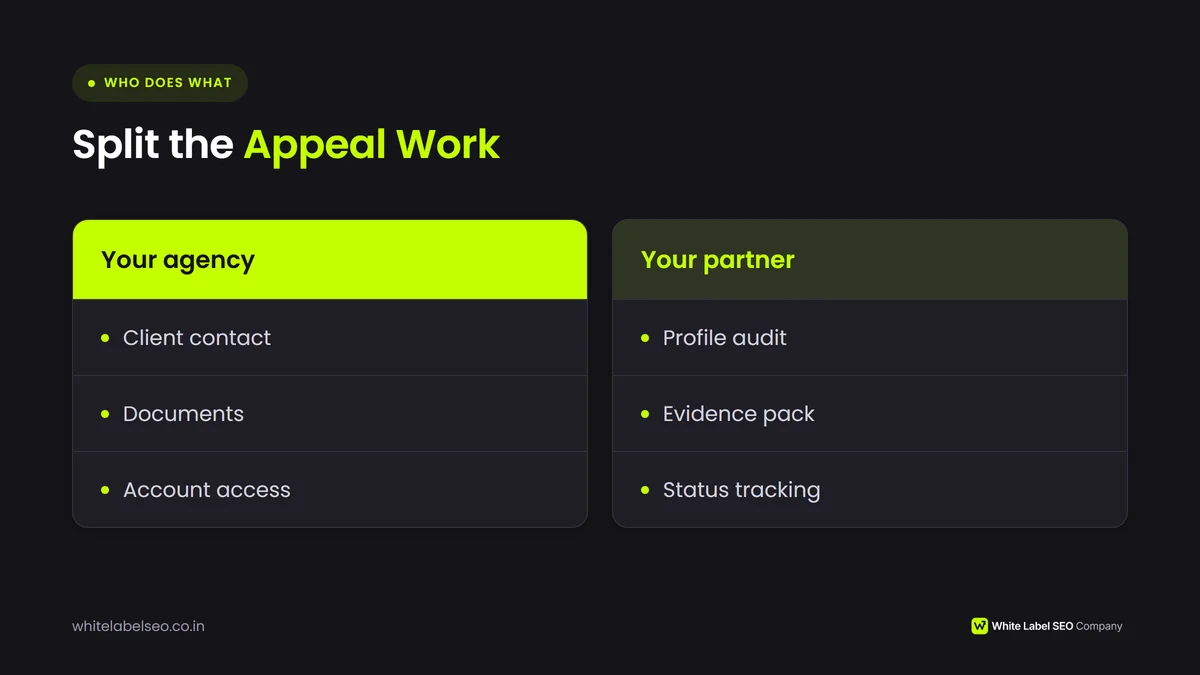
The appeals tool works through the Google Account linked to the profile, so decide before a suspension happens who holds that access and how the partner works in the tool. Ask your white label SEO partner for a written checklist that covers the guideline audit, the evidence list, the appeal wording and the status check.
The partner’s value is a consistent process, not a shortcut around Google’s rules. Our guide to white label partner communication shows how to set update times so the client hears from you before they ask.
What happens to owners and managers when a profile or account is removed?
When a profile is removed, the public can’t access it and its owners and managers can’t act on it. Google’s help page adds that reinstating the profile reinstates the profile and its owner and managers, and it describes what happens at the account level too.
If an owner’s Google Account is removed, all locations owned by that user are removed, and reinstating the account reinstates those locations. If a manager’s Google Account is removed, the manager is suspended on the accounts they manage, but the locations are not affected, and reinstating the account restores the manager’s access. A restricted account also suspends the Business Profiles it manages and blocks creating or claiming other profiles.
For an agency, this is the border of the topic: who holds ownership, and who is listed as manager, matters before anything goes wrong. Check the access setup for each client and record it in your onboarding file.
Frequently asked questions
Can you appeal a Business Profile suspension more than once?
No, Google’s help pages say appeals can only be submitted once. If a request is denied, Google says it might do an additional review, and you can submit evidence that was not in the original appeal through the local appeals contact form. Prepare the first appeal fully.
How long does Google take to decide a suspension appeal?
Google’s help page says appeals and decisions can take up to 5 business days. The help pages give no other timeline. Tell the client that 5 business days is the most Google states, check the appeals tool for the status, and do not promise reinstatement.
Should you create a new profile if the old one is suspended?
No, Google says not to create a new Business Profile for the same business. Appeal the suspended profile instead, and read the decision reason in the appeals tool before you change anything. The guidelines also say a business should have only 1 profile.
What documents help a Business Profile suspension appeal?
Google lists official business registration, a business license, tax certificates and utility bills as optional evidence. The business name and address on each document should match the profile. Upload only documents that match, and keep copies for your records.
What do you do when a client has 10 or more suspended locations?
Use the bulk reinstatement option in the appeals tool. Answer Yes to the question about 10 or more suspended locations, then attach a spreadsheet with each Business Profile ID and the supporting documents. Google sends one decision email, for the profile you selected in the tool.
What should you do next about Business Profile suspensions?
Audit one client’s profiles against the 6 rules in the table above this week, and record who holds ownership and manager access for each location. Then agree with your partner who prepares the evidence pack and who checks the appeals tool.
If you want a delivery partner that can run that process behind your brand, see how our white label SEO services work at White Label SEO.
Want a plan for profile suspensions?
Book a free strategy call and we will walk through how our local SEO team can support your clients behind your brand.
Sources
- Google Business Profile Help, “Fix suspended or disabled profiles”, accessed November 28, 2026. https://support.google.com/business/answer/4569145
- Google Business Profile Help, “Appeal Business Profile content & profile restrictions”, accessed November 28, 2026. https://support.google.com/business/answer/13597551
- Google Business Profile Help, Business Profile guidelines, accessed November 28, 2026. https://support.google.com/business/answer/3038177
